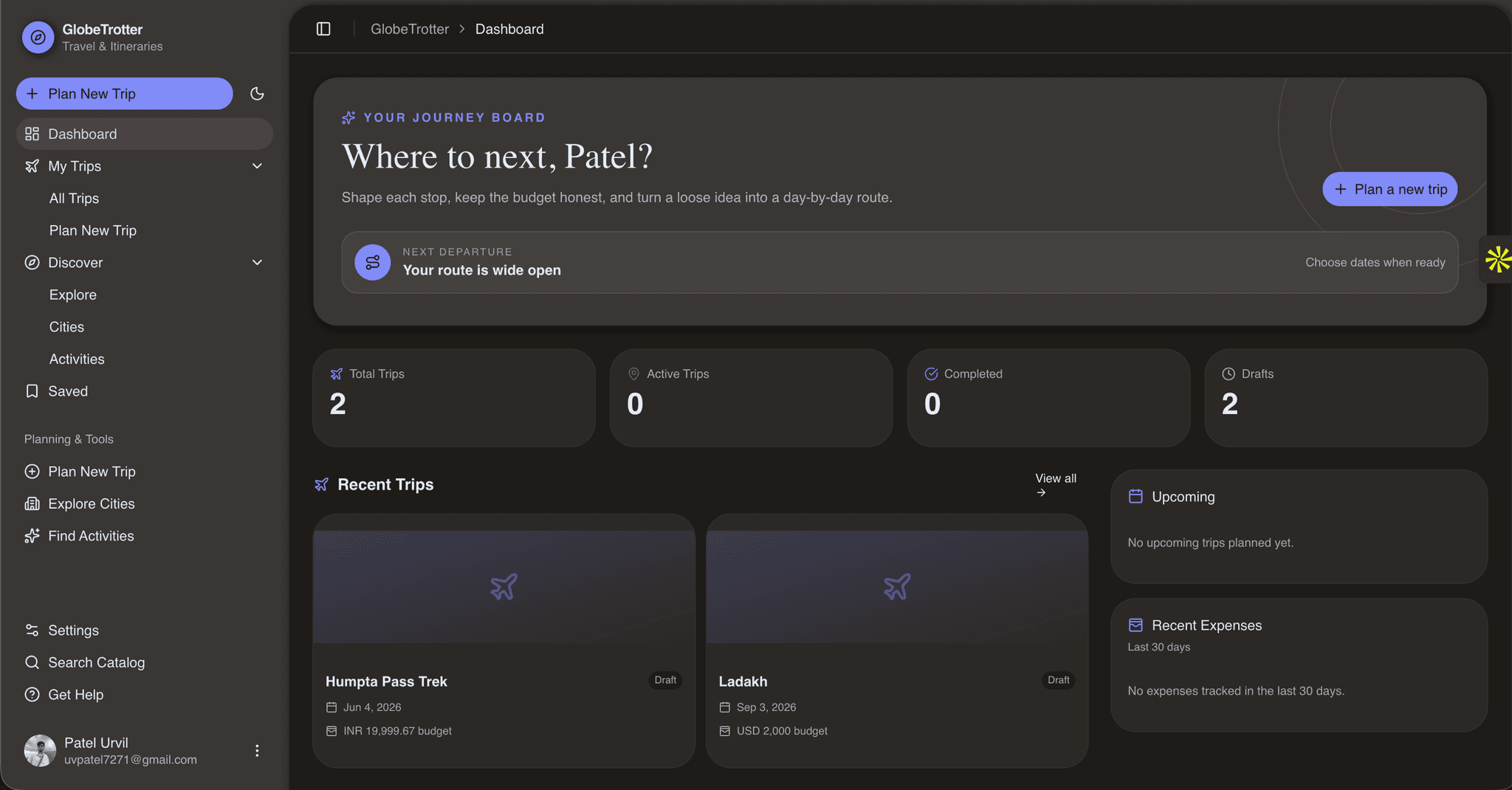
Project overview
GlobeTrotter
From dream to departure — a collaborative travel planner for multi-city trips, budgets, and group coordination.
GlobeTrotter is a full-stack web application that helps travelers discover destinations, build day-by-day itineraries, track expenses, invite collaborators, and share trips others can copy. It was built for the Odoo Hackathon 2026 and ships as a single repository: Next.js frontend, REST API, authentication, authorization, and a PostgreSQL data layer.





Why GlobeTrotter?
Planning a group trip usually means juggling spreadsheets, chat threads, maps, and expense apps. GlobeTrotter brings discovery, itinerary building, budgeting, collaboration, and sharing into one place.
| Pain point | GlobeTrotter answer |
| --- | --- |
| Ideas scattered across tools | Curated catalog of cities and activities with search and filters |
| Hard to plan multi-city routes | Ordered stops, auto-generated days, drag-and-drop scheduling |
| Budget surprises | Category budgets, expense logging, and planned-vs-actual charts |
| One person does all the work | Trip roles (owner, editor, viewer) with server-enforced access |
| Great trips stay private | Public trips and share links; others can fork into their own copy |
Quick start
git clone https://github.com/uvpatel/odoo-ldce.git
cd odoo-ldce
bun install
cp .env.example .env
# Edit .env — set DATABASE_URL, BETTER_AUTH_SECRET, BETTER_AUTH_URL, NEXT_PUBLIC_APP_URL
bun run db:migrate
bun run db:seed
bun run dev
Open http://localhost:3000. Create an account at /sign-up for local testing — seeded demo users do not include passwords.
Contents
- Features
- Tech stack
- Architecture
- Data model
- Getting started
- Environment variables
- Scripts
- Routes and API
- Authentication and authorization
- Project structure
- Development and deployment
- Team
Features
Discover
- Browse and search a curated catalog of countries, cities, and activities
- Filter activities by city or category; view duration, average cost, and ratings
- Save destinations to a personal shortlist
- Explore public trips for inspiration
Plan
- Create trips with dates, lifecycle status, visibility, currency, and overall budget
- Build ordered multi-city routes with arrival and departure dates
- Organize days with activities, transport, accommodation, meals, or custom entries
- Reorder stops and itinerary items with drag-and-drop
- Switch between overview, daily itinerary, and calendar views
Budget
- Set category budgets (transport, accommodation, activities, food, shopping, other)
- Log estimated or confirmed expenses and record who paid
- Compare planned budgets with actual spending via summaries and charts
Collaborate and share
- Invite members as
owner,editor, orviewer - Enforce access rules for editing, member management, and budgets
- Generate revocable public share links with optional expiration
- Copy a public or shared itinerary into a new personal trip
Accounts and administration
- Email/password sign-in plus optional Google and GitHub OAuth
- Password recovery and profile, preference, privacy, and account settings
- Light, dark, and system themes
- Admin portal for analytics and user, trip, city, and activity management
Tech stack
| Layer | Technologies | | --- | --- | | Application | Next.js 16 (App Router), React 19, TypeScript | | UI | Tailwind CSS 4, shadcn/ui, Base UI, Lucide & Tabler icons | | Client state | TanStack React Query | | Forms | React Hook Form, Zod | | Database | PostgreSQL (Neon serverless), Drizzle ORM, Drizzle Kit | | Auth | Better Auth with Drizzle adapter | | Interactions | dnd-kit, Motion, Recharts | | Tooling | Bun, ESLint 9 |
Architecture
GlobeTrotter follows a layered design. UI components call feature-level API clients and React Query hooks. Route handlers validate input and establish the session, then delegate to services. Services enforce business rules; repositories hold Drizzle queries.
flowchart LR
    UI[Pages & React components] --> Query[Feature hooks & React Query]
    Query --> API[Next.js route handlers]
    API --> Auth[Better Auth & access checks]
    API --> Service[Domain services]
    Service --> Repo[Repositories]
    Repo --> ORM[Drizzle ORM]
    ORM --> DB[(PostgreSQL / Neon)]
Key patterns
- Server-rendered layouts protect private route groups; signed-out users are redirected to
/signin - React Query caches reads; mutations invalidate related query keys
- Trip access checks are centralized so itineraries, budgets, members, and sharing share one policy
Data model
Schema modules live under src/db/schema:
| Domain | Tables | Purpose |
| --- | --- | --- |
| Auth | user, session, account, verification | Identities, sessions, OAuth providers, tokens |
| Travel | trips, trip_members, trip_stops, trip_days, itinerary_items | Journeys, collaborators, routes, daily plans |
| Catalog | countries, cities, activity_categories, activities | Discoverable destinations and activities |
| Budget | trip_budgets, expenses | Category allocations and costs |
| Social | saved_destinations, trip_shares | Bookmarks and token-based sharing |
| User | user_preferences | Locale, currency, timezone, theme, notifications |
Core enums
| Type | Values |
| --- | --- |
| Trip lifecycle | draft, planned, ongoing, completed, cancelled |
| Visibility | private, friends, public |
| Trip membership | owner, editor, viewer |
| Itinerary item | activity, transport, accommodation, meal, custom |
| Expense category | transport, accommodation, activity, food, shopping, other |
SQL migrations and snapshots are committed under drizzle/.
Getting started
Prerequisites
- Bun 1.3+ (repo pins
bun@1.3.14) - PostgreSQL — local or hosted (e.g. Neon)
- Node.js 20+ if your deployment environment requires it
Installation
-
Clone and install dependencies
bun install cp .env.example .env -
Configure environment — see Environment variables. At minimum set
DATABASE_URL,BETTER_AUTH_URL, andNEXT_PUBLIC_APP_URL. Use a strongBETTER_AUTH_SECRETin production. -
Prepare the database
bun run db:migrate
bun run db:seed
The seed is idempotent: it adds countries, cities, activity categories, activities, and demo travel data. Seeded user rows (e.g.
admin@globetrotter.com) are for relational demo data only — sign up through the app for a working login. -
Run the dev server
bun run devVisit http://localhost:3000. Marketing and explore pages are public; dashboard and trip pages require authentication.
Environment variables
| Variable | Required | Description |
| --- | --- | --- |
| DATABASE_URL | Yes | PostgreSQL connection string |
| BETTER_AUTH_SECRET | Production | Auth signing secret (32+ random characters) |
| BETTER_AUTH_URL | Yes | Canonical app origin, e.g. http://localhost:3000 |
| NEXT_PUBLIC_APP_URL | Yes | Public URL for metadata and links |
| GOOGLE_CLIENT_ID / GOOGLE_CLIENT_SECRET | No | Google OAuth (both required to enable) |
| GITHUB_CLIENT_ID / GITHUB_CLIENT_SECRET | No | GitHub OAuth (both required to enable) |
| RESEND_API_KEY | For email | Password reset and email-change delivery |
| EMAIL_FROM | For email | Verified sender address |
| GEMINI_API_KEY | No | Reserved for future AI features |
Never commit .env or production secrets. Auth URLs must match your deployed origin. On Vercel, Better Auth also reads VERCEL_URL.
Scripts
| Command | Description |
| --- | --- |
| bun run dev | Start the development server |
| bun run build | Production build |
| bun run start | Serve a production build |
| bun run lint | Run ESLint |
| bun run db:generate | Generate a migration after schema changes |
| bun run db:migrate | Apply pending migrations |
| bun run db:seed | Seed catalog and demo data |
scripts/reset-dev-db.ts truncates and reseeds a development database. It is not exposed as an npm script — review the file and use only on disposable databases.
Routes and API
Next.js route groups (e.g. (dashboard)) organize layouts but do not appear in URLs.
Pages
| Area | Routes |
| --- | --- |
| Marketing | /, /explore, /privacy, /terms |
| Auth | /signin, /signup, /sign-in, /sign-up, /forgot-password, /reset-password |
| Dashboard | /dashboard, /budget, /reports, /saved |
| Discovery | /discover, /discover/cities, /discover/activities, detail pages |
| Trips | /trips, /trips/new, /trips/[tripId] (+ itinerary, calendar, budget, members, share, settings) |
| Settings | /settings, /settings/profile, /settings/preferences, /settings/privacy, /settings/account |
| Sharing | /shared/[token] |
| Admin | /admin, /admin/analytics, /admin/users, /admin/trips, /admin/cities, /admin/activities |
Parallel and intercepted routes support trip creation and itinerary detail modals without losing surrounding context.
REST API
Handlers under src/app/api return JSON.
| Resource | Endpoints | Capabilities |
| --- | --- | --- |
| Auth | /api/auth/[...all] | Registration, sessions, OAuth, account flows |
| User | /api/users/me, .../preferences | Profile and preferences |
| Dashboard | /api/dashboard | Aggregated trips, budgets, recommendations |
| Catalog | /api/cities, /api/activities | Search, list, detail |
| Saved | /api/saved-destinations | List, toggle, remove bookmarks |
| Trips | /api/trips, /api/trips/[tripId] | CRUD (soft delete) |
| Itinerary | .../stops, .../days, .../itinerary | Manage and reorder route & schedule |
| Finance | .../budget, .../expenses | Budgets and expenses |
| Members | .../members | Invite, change roles, remove |
| Sharing | .../share, /api/shared/[token] | Share links and public resolution |
| Public | /api/public/trips, .../copy | Browse and fork public trips |
| Admin | /api/admin/* | Analytics and admin listings |
Request/response shapes use Zod schemas in src/lib/validation and pagination types in src/types/pagination.ts.
Authentication and authorization
Authentication — Better Auth stores users, sessions, linked accounts, and verification tokens in PostgreSQL. Email/password is always enabled; Google and GitHub activate when both client ID and secret are set. Sessions last 7 days, refresh daily, and use a 5-minute cookie cache.
Authorization has two layers:
- Platform roles —
employee,manager,hr,admin,super_admincontrol app-wide access. New registrations default toemployee; role and status cannot be set from the client. - Trip roles —
owner,editor,viewerscope access to a single trip. Owners manage the trip and members; editors change content and budgets; viewers are read-only. Platform admins can manage any trip.
Protected layouts require an active session. Suspended or inactive users are sent to /unauthorized. Public trips and valid share tokens allow read access without membership; all mutations re-check permissions on the server.
Project structure
.
├── drizzle/                 # Migrations and schema snapshots
├── public/                  # Static assets
├── scripts/                 # Dev database utilities
├── src/
│   ├── app/                 # Pages, layouts, metadata, API routes
│   ├── components/          # Shared UI and app components
│   ├── config/              # Site config, navigation, permissions
│   ├── constants/           # Sidebar and static UI data
│   ├── db/                  # Client, schema, relations, seed
│   ├── features/            # Per-feature API clients, hooks, components
│   ├── hooks/               # Reusable React hooks
│   ├── lib/                 # Auth, validation, formatting, utilities
│   ├── providers/           # React Query and theme providers
│   ├── server/
│   │   ├── repositories/    # Drizzle data access
│   │   └── services/        # Business logic and authorization
│   └── types/               # Shared TypeScript types
├── drizzle.config.ts
├── next.config.ts
└── package.json
The @/* path alias maps to src/*.
Development and deployment
Before opening a PR
bun run lint
bun run build
Schema changes
- Edit modules under
src/db/schema - Run
bun run db:generateand review SQL indrizzle/ - Apply with
bun run db:migrateon a dev database - Update the seed if new reference data is needed
There is no automated test suite yet — rely on lint, production build, and manual checks including authorization boundaries.
Production deployment
- Provision PostgreSQL and set production env vars
- Run migrations against the production database
- Build and deploy the Next.js app (e.g. Vercel)
- Configure OAuth callback URLs and a verified Resend sender when using those features
Do not run scripts/reset-dev-db.ts against production.
Team
Built for the Odoo Hackathon 2026 by Urvil Patel and team.
- Repository: github.com/uvpatel/odoo-ldce
- Presentation notes: see
PRESENTATION.mdfor pitch deck, demo script, and Q&A prep
GlobeTrotter — making group travel planning coherent from discovery through departure.