Project overview
TravelLoop Project Explanation Script
1. Opening
live demo
- Traveloop(https://traveloopl.vercel.app/)
Good morning/afternoon everyone.
Today I am presenting TravelLoop, an AI-powered travel planning web application. The main goal of this project is to help users plan complete trips from one place. Instead of using separate tools for itinerary planning, budgeting, packing, and notes, TravelLoop combines all of these features inside a single dashboard.
The project is built using Next.js 16, React 19, TypeScript, MongoDB with Mongoose, Clerk authentication, Zustand for client-side state, and Gemini AI for automatic trip generation.
2. Problem Statement
When people plan a trip, they usually have to manage many things manually:
- Where to go
- What activities to do each day
- How much the trip will cost
- What to pack
- Notes like booking details, reminders, or places to visit
This becomes scattered across multiple apps like notes, spreadsheets, maps, and chats. TravelLoop solves this by giving users one organized platform where they can generate, save, and manage their travel plan.
3. Main Idea
The core idea of TravelLoop is simple:
A user logs in, creates or generates a trip, and then manages every part of that trip from the dashboard.
There are two ways to create a trip:
- AI Generator: The user enters a prompt like "5-day Goa trip under INR 25000", selects travel style, pace, and starting point, and Gemini generates the trip.
- Manual Creation: The user can enter trip title, destination, dates, budget, and description manually.
After the trip is created, the user can manage itinerary, expenses, packing checklist, notes, destinations, and activities.
4. Technology Stack
For the frontend, I used Next.js App Router and React client components. Pages are organized inside the src/app folder.
For UI, the project uses reusable components from the src/components/ui folder, along with Tailwind CSS classes and icon libraries like Lucide React.
For authentication, I used Clerk. The app protects dashboard and API routes so only logged-in users can access their data.
For the database, I used MongoDB with Mongoose models. Each user has their own trips, activities, expenses, packing items, and notes.
For validation, I used Zod schemas before saving data to the database.
For AI, the app calls the Gemini API from the server side and asks it to return structured JSON. That JSON is then normalized and saved into MongoDB.
5. Project Structure
The main project folders are:
src/app: Contains pages and API routes.src/components: Contains reusable UI and layout components.src/models: Contains Mongoose database models.src/controllers: Contains database operation logic.src/schemas: Contains Zod validation schemas.src/store: Contains Zustand stores for frontend state.src/services: Contains the Gemini AI service.src/lib: Contains shared utilities like MongoDB connection.
This structure separates responsibilities clearly. Pages handle UI, API routes handle requests, controllers handle database operations, and models define how data is stored.
6. Authentication Flow
The application uses Clerk for sign in and sign up.
In the root layout, the app is wrapped with ClerkProvider, which makes authentication available throughout the project.
The proxy.ts file uses Clerk middleware to protect routes. Sign-in and sign-up pages are public, but other routes require authentication.
The dashboard layout also checks the logged-in user using Clerk's auth() function. If there is no user, the app redirects the person to /sign-in.
This ensures that every user only sees and manages their own travel data.
7. Landing Page
The landing page is located at src/app/page.tsx.
It is made by combining multiple reusable sections:
- Hero section
- Team showcase
- Tabs section
- Features section
- Draggable card section
- Animated modal section
The landing page introduces the product visually and gives users a first impression of the travel planning platform.
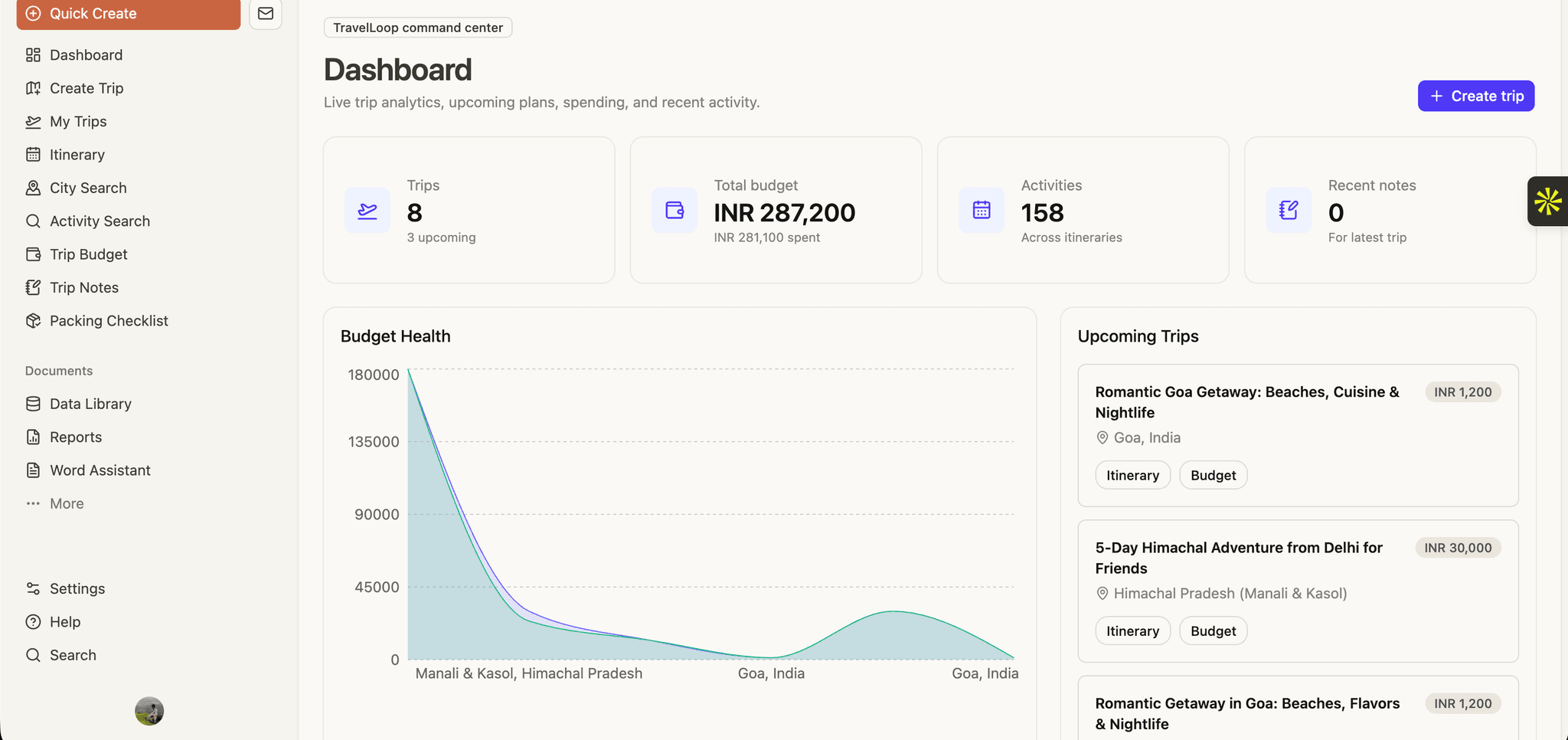
8. Dashboard
After login, users reach the dashboard.
The dashboard fetches data from:
/api/trips/api/expenses/api/activities/api/notes
It shows important metrics such as:
- Total trips
- Total budget
- Total spent
- Number of activities
- Recent notes
It also includes a budget health chart using Recharts, upcoming trips, and quick links to features like city search, packing checklist, and trip notes.
So the dashboard acts like the command center of the whole app.
9. Create Trip Feature
The Create Trip page is one of the most important parts of the project.
It has two tabs:
First is the AI Generator. The user enters a travel prompt, travel style, pace, and starting point. The frontend sends this data to /api/ai/generate-trip.
On the server side, the route:
- Checks authentication.
- Connects to MongoDB.
- Sends the prompt to Gemini.
- Receives structured JSON.
- Creates the trip.
- Saves itinerary activities.
- Saves packing list items.
- Saves budget breakdown as expenses.
Second is the Manual tab. Here, the user enters the trip details manually. The data is sent through the trip store to /api/trips, validated with Zod, and saved in MongoDB.
10. AI Generation
The AI logic is inside src/services/ai.service.ts.
The app sends a carefully designed prompt to Gemini and requests a JSON response with fields like:
- Trip title
- Destination
- Description
- Start and end dates
- Budget
- Travelers
- Day-wise itinerary
- Packing list
- Budget breakdown
The response is parsed and normalized before saving. This is important because AI output can sometimes be inconsistent, so the service checks that required fields exist and safely reads strings and numbers.
This makes the AI feature more reliable.
11. My Trips
The My Trips page displays all trips created by the logged-in user.
It uses the Zustand trip store from src/store/useTripStore.ts.
The page shows each trip as a card with:
- Cover image
- Trip title
- Destination
- Status
- Dates
- Budget
- Link to view itinerary
- Delete option
This page is useful for managing all trips in one place.
12. Itinerary Builder
The Itinerary Builder lets users manage day-wise activities for a selected trip.
It fetches the user's trips and then loads activities for the selected trip using /api/activities?tripId=....
Users can add activities with:
- Title
- Location
- Time
- Day
- Cost
- Type
Activities are grouped by day and displayed as a timeline. The page also calculates total activity cost and shows trip summary information.
The UI uses optimistic updates, so when a user adds or deletes an activity, the interface updates immediately and then confirms with the backend.
13. Budget and Expenses
The Trip Budget page tracks spending for a selected trip.
It fetches trips and expenses, then calculates:
- Total budget
- Total spent
- Remaining amount
- Percentage used
It also shows visual charts:
- A pie chart for category-wise spending
- A bar chart for expense pace
Users can add expenses with category, amount, and description. If spending goes beyond the budget, the UI highlights the over-budget status.
14. Packing Checklist
The Packing Checklist feature helps users track what they need to carry.
Items are connected to a trip and stored in MongoDB. Each item has:
- Item name
- Category
- Checked status
The page groups items by category and shows progress, such as "5 of 10 items packed". Users can add, check, uncheck, and delete packing items.
This feature is also automatically filled when the user generates a trip with AI.
15. Trip Notes
The Trip Notes page works like a small travel journal.
Users can create notes with:
- Title
- Content
- Tags
They can also search notes by title, content, or tags. This is useful for storing booking details, reminders, restaurant names, or personal travel memories.
Like other modules, notes are linked to a trip and protected by user authentication.
16. City Search
The City Search page shows destinations based on the user's existing trips.
It groups trips by destination and displays each destination with:
- Image
- Number of planned trips
- Total budget
- Total travelers
- Link to open itinerary
This makes the app feel personalized because it does not show random cities; it shows cities connected to the user's own travel plans.
17. Activity Search
The Activity Search page lets users search activities that already exist in their saved itineraries.
Users can search by text or filter by categories like:
- Sightseeing
- Food
- Activity
- Stay
- Transport
There is also an option to duplicate an activity into the latest trip. This helps users reuse previous ideas.
18. Backend API Design
The backend is built using Next.js API route handlers inside src/app/api.
Important API routes include:
/api/trips/api/activities/api/expenses/api/packing/api/notes/api/itinerary/api/ai/generate-trip
Each route follows a common pattern:
- Connect to MongoDB.
- Check Clerk authentication.
- Read request data or query parameters.
- Validate input using Zod.
- Call the controller.
- Return JSON response.
This pattern keeps the backend consistent and easier to maintain.
19. Database Design
The project uses separate MongoDB collections for different parts of the app.
The main models are:
Trip: Stores title, destination, dates, budget, travelers, status, and user ID.Activity: Stores trip ID, title, type, cost, duration, time, location, and day.Expense: Stores trip ID, category, amount, description, and user ID.PackingItem: Stores trip ID, item name, category, checked status, and user ID.Note: Stores trip ID, title, content, tags, and user ID.
The most important field is userId. It comes from Clerk and ensures that data belongs to the correct logged-in user.
20. State Management
For client-side state, the app uses Zustand stores.
There are stores for:
- Trips
- Expenses
- Packing items
- Notes
These stores provide functions like fetch, create, update, and delete. This keeps API calling logic reusable and prevents duplicating the same fetch logic in many components.
Some pages also use local React state for page-specific data like search query, form inputs, loading states, and selected trip ID.
21. UI and User Experience
The UI is built using reusable components such as buttons, cards, badges, inputs, tabs, skeleton loaders, sidebars, and charts.
The dashboard uses a sidebar layout with navigation links for the major features. Loading states are handled using skeleton components, which makes the app feel smoother.
Charts are created with Recharts, animations use Motion, and icons use Lucide React. Together, these make the application more interactive and visually understandable.
22. Example User Flow
A typical user flow is:
- The user signs in.
- The user opens the dashboard.
- The user clicks Create Trip.
- The user enters a prompt like "4-day Goa trip with beaches and nightlife under INR 25000".
- Gemini generates the trip.
- The app saves the trip, itinerary, packing list, and budget automatically.
- The user opens My Trips.
- The user views the itinerary.
- The user adds or edits activities.
- The user tracks expenses, packing, and notes.
This shows how the project moves from a simple idea to a complete travel planning workflow.
23. Security and Data Safety
Security is handled mainly through Clerk authentication and user-specific database queries.
Every important API checks whether the user is logged in. Database queries include the userId, so a user can only access records that belong to them.
Input validation is handled with Zod before saving data, which reduces invalid data entering the database.
Environment variables are used for sensitive values like MongoDB URI and Gemini API key.
24. Challenges
One challenge was handling AI output reliably. Since AI can generate unpredictable text, I used JSON response settings, a response schema, parsing, and normalization.
Another challenge was connecting different modules together. A generated trip is not just one record; it creates a trip, many activities, packing items, and budget entries. The backend handles this step-by-step.
A third challenge was keeping the UI responsive. I used loading states, skeletons, charts, and optimistic updates so the user gets fast feedback.
25. Future Improvements
In the future, this project can be improved with:
- Drag-and-drop reordering for itinerary activities.
- Real map integration for routes and places.
- Shared trips with friends.
- PDF export of the full itinerary.
- Better currency support.
- Notifications and reminders.
- More advanced AI editing, like "make this trip cheaper" or "add one adventure activity each day".
26. Closing
To summarize, TravelLoop is an AI travel planner that combines trip creation, itinerary planning, budget tracking, packing checklist, notes, and discovery features.
The project demonstrates full-stack development using Next.js, authentication with Clerk, database management with MongoDB and Mongoose, validation with Zod, state management with Zustand, charts and interactive UI, and AI integration using Gemini.
Thank you.
Short 1-Minute Version
TravelLoop is an AI-powered travel planning web app built with Next.js, React, TypeScript, MongoDB, Clerk, Zustand, and Gemini AI.
The main problem it solves is that trip planning is usually scattered across many apps. TravelLoop brings everything into one dashboard.
Users can sign in, create a trip manually, or generate a full trip using Gemini AI. The AI creates a title, destination, itinerary, packing list, and budget breakdown. The backend saves all of this into MongoDB.
After that, users can manage their trips through features like My Trips, Itinerary Builder, Trip Budget, Packing Checklist, Trip Notes, City Search, and Activity Search.
The backend API routes protect data using Clerk authentication, validate inputs with Zod, and use Mongoose controllers and models for database operations.
Overall, TravelLoop is a full-stack project that combines authentication, database design, AI integration, state management, charts, and a complete user workflow for travel planning.